If you’ve ever stared at Google Search Console wondering why is my blog traffic dropping when your rankings haven’t actually moved, you’re not imagining things. I’ve seen this exact pattern show up as a Freelance Digital Marketing Expert in Thrissur more than once, and it always throws people off, because the instinct is to assume the page lost its ranking. Often, that’s not what’s happening at all.
Google Rankings But No Traffic? This Is More Common Than You Think
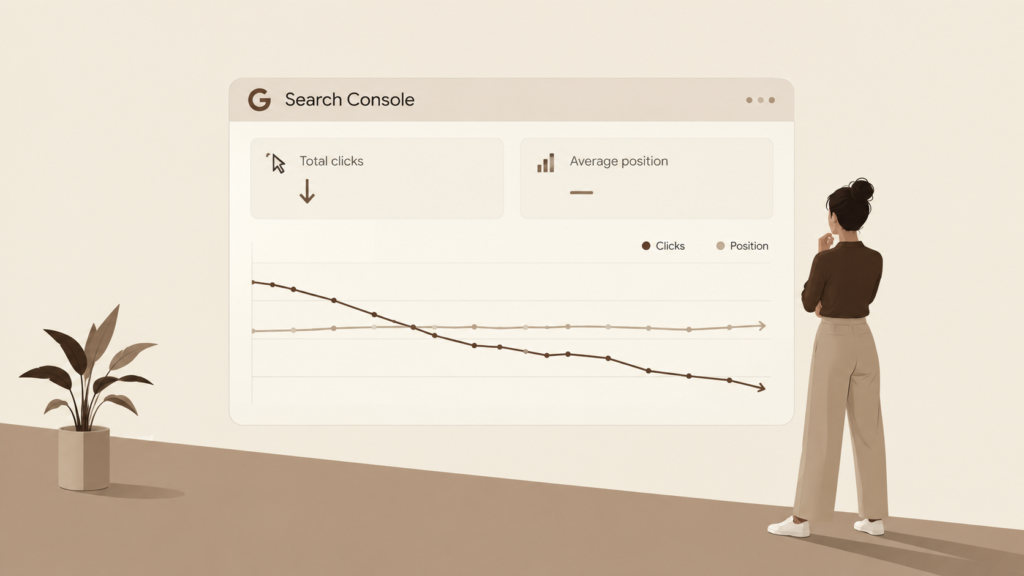
Here’s the confusing part: your position in Google Search Console can look completely stable, and your traffic still drops. This is usually the moment someone first asks themselves why is my blog traffic dropping, because a stable position is exactly what’s supposed to mean stable traffic. When I’ve looked into cases like this, the ranking itself usually wasn’t the problem. What changed was how much of the search results page your listing actually gets to compete for, not where it sits within that page.
It’s worth repeating, because it trips people up every time: if you’re asking why is my blog traffic dropping while your average position hasn’t moved, the answer is rarely “Google demoted you.” More often, the page itself is still doing its job. What’s shifted is the environment around it. Search engine results pages aren’t just ten blue links anymore. AI Overviews, featured snippets, “People Also Ask” boxes, video carousels, and ads all take up space that used to belong to organic listings. So even if you’re sitting in the same spot, fewer people are scrolling far enough to click your result — which is exactly why is my blog traffic dropping even though nothing seems to have changed on your end.
This distinction matters because it changes how you should spend your time. A genuine ranking drop calls for a content or authority fix. A why is my blog traffic dropping scenario caused by SERP crowding calls for a completely different response: winning back attention on the page, not earning a better position you already have. Treating the two as the same problem is where most of the wasted effort happens — I’ve seen people spend weeks reworking content and building links to “fix” a ranking that was never actually broken, when the real leak was happening above their listing on the results page itself.
It’s worth being upfront about something here: this isn’t happening on every query or every page. Transactional and comparison-heavy searches, the kind where people are actively deciding between options, still tend to drive solid click-through rates because people want to read beyond a short summary. The pages that feel this shift hardest are usually the simpler, quick-answer, informational ones — the kind where a single sentence or two genuinely satisfies what the searcher needed. If your traffic drop is concentrated on that type of content, that pattern alone is a useful clue before you even open Search Console.
How I Diagnose It: Ranking Drop vs. CTR Drop
When a client or my own post loses traffic, I don’t jump straight to rewriting anything. I follow a simple comparison process first.
- Compare periods in Search Console. I look at clicks, impressions, average position, and CTR for the affected period against the previous one.
- Check if average position held steady. If the position hasn’t moved much but clicks and CTR have dropped, that’s a strong signal it’s not a ranking problem.
- Search the query manually. I’ll actually type in the main queries the page ranks for and look at what’s sitting above my result — AI Overviews, featured snippets, ads, videos, or other features eating up space.
- Only if impressions and position drop too do I start treating it as an actual ranking or search-demand issue rather than a visibility one.
This order matters. Jumping to conclusions before checking impressions and CTR is how people end up “fixing” a page that was never broken.
SEO Traffic Drop 2026: Why It’s Happening to More Sites Right Now
This isn’t just a one-off issue. It’s part of a broader pattern that’s making more bloggers and site owners ask why is my blog traffic dropping right now. As AI-generated answers become a bigger part of how Google displays results, more informational queries get partially or fully answered right there on the results page. According to Google’s own explanation of AI Overviews, these summaries are designed to give people a quick answer along with links to explore further, which means the click is no longer guaranteed even when your content is the source — and it’s one of the clearest reasons why is my blog traffic dropping even when everything else looks unchanged.
What makes this especially frustrating is that it doesn’t show up as a single dramatic event. It’s rarely one big cliff in your traffic graph. It’s more often a slow, steady erosion month over month, which is part of why so many bloggers don’t notice it until the numbers have already fallen significantly. By the time someone actually stops to ask why is my blog traffic dropping, months of smaller losses have usually already added up.
The practical effect is that pages targeting simple, quick-answer questions tend to feel this shift the most. Pages built around more complex or decision-heavy topics, the kind where people still want to compare options or read details before acting, tend to hold up better. If you’re still asking why is my blog traffic dropping after ruling out a ranking issue, checking which type of query your page targets is often the next clearest signal.
It also helps to look at this pattern across your whole site rather than just one post. If several pages targeting similar, quick-answer topics are all seeing the same kind of decline, that’s a much stronger signal than a single page dipping on its own. A site-wide pattern like that usually points to the same underlying cause, and it means the fix should be applied consistently across those pages rather than treated as a one-off problem to patch individually.
How to Increase Blog Traffic Despite AI Search
Once I’ve confirmed it’s a visibility or CTR issue rather than a ranking drop, I don’t rewrite the whole page immediately. Instead, I focus on making the listing compete harder for attention. This is usually the stage where the answer to why is my blog traffic dropping turns into something you can actually act on.
- Test the title and meta description. Small changes here can meaningfully shift CTR without touching the core content.
- Make sure the page directly answers the query. If someone’s question can be answered in one clear sentence near the top, that content is more likely to get pulled into a featured snippet or cited in an AI-generated answer.
- Add structured, scannable sections. Clear headings, short answers, FAQs, and lists tend to perform better for both snippet and AI-answer visibility.
- Check what’s outranking or out-featuring you. If competitors are picking up FAQ boxes or list-based snippets, look at what they’re doing well and improve your page where it genuinely adds value, not just to copy them.
- Monitor Search Console afterward. Give it a few weeks, then check whether impressions, CTR, and clicks actually moved before deciding your changes worked.
None of these steps require guessing. Each one is a direct response to a specific signal in your data, which is why treating why is my blog traffic dropping as a diagnostic question first keeps you from wasting effort on changes that were never going to move the needle.
If you go through this list and nothing shifts after a few weeks, that’s useful information too — it usually means the real answer to why is my blog traffic dropping sits closer to content quality or relevance than to CTR, and it’s worth revisiting the ranking-drop checks from earlier before making further changes.
This is a practical way to think about how to increase blog traffic despite AI search without treating every drop as a five-alarm fire.
The Biggest Mistake I See People Make
The most common mistake is reacting too fast. The moment traffic drops, a lot of people assume the page lost rankings and immediately rewrite the entire post or swap out keywords. But if the rankings are actually still stable, that kind of overhaul can waste time and sometimes even hurt a page that wasn’t the real problem. I’ve seen this happen more than once: someone panics the moment they notice a decline, rewrites a perfectly good post from top to bottom, and ends up with weaker results than before, simply because the actual answer to why is my blog traffic dropping was never about the content itself.
On the flip side, ignoring a small decline is just as risky. A minor drop can be an early warning sign. Checking Search Console early, comparing clicks, impressions, CTR, and average position, and then looking at what the actual search results page looks like, gives you a much clearer picture before you decide what, if anything, needs to change. Waiting too long to investigate is its own version of the same mistake — by the time a small dip turns into a noticeable one, you’ve lost the early, easier-to-interpret data that would have told you why is my blog traffic dropping in the first place.
The middle ground is what actually works: treat every drop, even a small one, as worth a quick look, but resist the urge to act until you’ve confirmed what’s really happening. Somewhere between panicking and ignoring it completely is where most people should be sitting. A five-minute Search Console check costs you almost nothing, while a full content rewrite done on a guess can cost you weeks of work and, in some cases, make the page perform worse than it did before you touched it. Building that quick-check habit is ultimately the difference between someone who reacts to every dip in traffic and someone who genuinely understands why is my blog traffic dropping when it happens.
FAQ
Why is my blog traffic dropping if my rankings haven’t changed?
It’s often not a ranking issue at all. SERP features like AI Overviews, featured snippets, and ads can reduce how many people click through even when your position stays the same. Checking CTR and impressions in Search Console will usually tell you which one it is.
How do I know if it’s a CTR problem and not a ranking problem?
Compare average position across two time periods in Search Console. If position is stable but clicks and CTR dropped, look at the actual search results for your target queries to see what’s now taking up space above your listing.
Can you still increase blog traffic despite AI search features?
Yes. Optimizing titles and meta descriptions, structuring content to directly answer queries, and building out clear FAQ or list sections can help you win back clicks or get cited in AI-generated answers.
Key Takeaways
- A stable ranking doesn’t guarantee stable traffic — check CTR and impressions, not just position.
- Search Console comparisons are the fastest way to tell a ranking problem apart from a visibility problem.
- Don’t rewrite an entire page the moment traffic dips; diagnose first.
- Small changes to titles, meta descriptions, and answer-first content structure often recover more clicks than a full rewrite.
- Ignoring small declines is as risky as overreacting to them — check in early.